Voidware · Android
3D Conversion Calculator
JL-120, ten digits
Convert metric and imperial units. Looks, moves and operates just like having a real calculator in your hand.
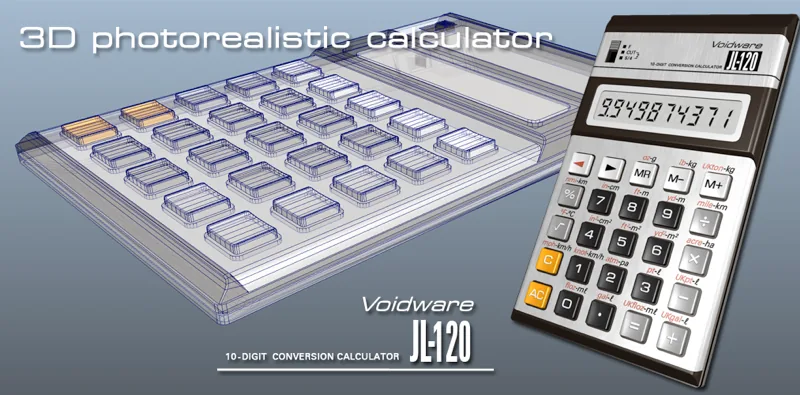
Every conversion on the keys
A photorealistic 3D object rather than a picture of a calculator with buttons drawn on it. Pick it up, turn it over, press the keys. Every key carries a conversion printed above it; inches to centimetres, miles to kilometres, gallons to litres and so on. The conversion you want is one press away rather than buried in a menu.
- Convert between metric and imperial units
- Both US and UK gallons, fluid oz and pints
- Rotate, turn, scale and move it in 3D with your fingers
- Buttons physically press, with sound
- Move the mode switch with your finger
- Even the on/off button works
- Tap the screen to reset the position, ready for use
- Tilt affects the light reflections
- Life-sized on a large screen
Screenshots
Using it
The calculator is an active 3D object. Touch the sides, the screen or the top and turn it around with your finger. Two fingers pinch the view in and out, and turn it.
Tap the screen to bring it back to the home position. Tapping toggles between two: tilt view, which shows the whole calculator best, and face view, which brings the keyboard and display close to the glass and is easier for actually calculating.
The gear icon in the top right adjusts the light brightness and the key click volume.
Where it comes from
This model is based on the Casio JL-120, made in Japan. It was one of many semi-desk calculators built for plain arithmetic with large, easy-to-press buttons, but still small enough to be stowed in a briefcase.
The JL-120 has an LCD display, and sits at the transition: after the older vacuum fluorescent machines and before the much smaller ones running from button cells. Instead, this took two large batteries.
The original worked internally to ten digits. This model works to higher precision so, for some calculations, it's more accurate than the machine it copies.
Differences from the original
Part of the point of bringing these machines back is to leave their limitations behind. So this is not quite faithful on purpose.
- The conversions
- The Casio JL-120 had none of them! They were added to make the machine far more useful, and they fitted around the keypad without having to shrink the buttons; which makes this machine rather unique.
- The C key
- On the original, “C” cleared the whole entry. Modern machines delete the last digit instead, like a backspace. So a typo can be fixed without starting again. This works the modern way.
- Rounding
- Rather shockingly, the original did not round the number on display: 2 ÷ 3 showed as 0.666666666 rather than 0.666666667. This rounds the display properly.
Questions
- Why aren’t there any screen annunciators?
- The original didn’t have any, but they might appear in a future release.
- Is this an emulator?
- No. It is a from-scratch simulator.
- Does it work in decimal?
- Yes! Like real calculators, all the arithmetic is decimal, not binary.